Head-to-head wireless mouse comparison

Logitech MX Master 3S vs MX Vertical

MX Master 3S is the better Logitech productivity mouse for most desks because it combines an 8,000 DPI sensor, glass tracking support, Quiet Clicks, MagSpeed scrolling, and Logi Options+ customization. MX Vertical is the alternative if the whole reason you are shopping is an upright 57-degree grip shape.

As an Amazon Associate, Worth Adding earns from qualifying purchases. We may earn a commission if you buy through our links.

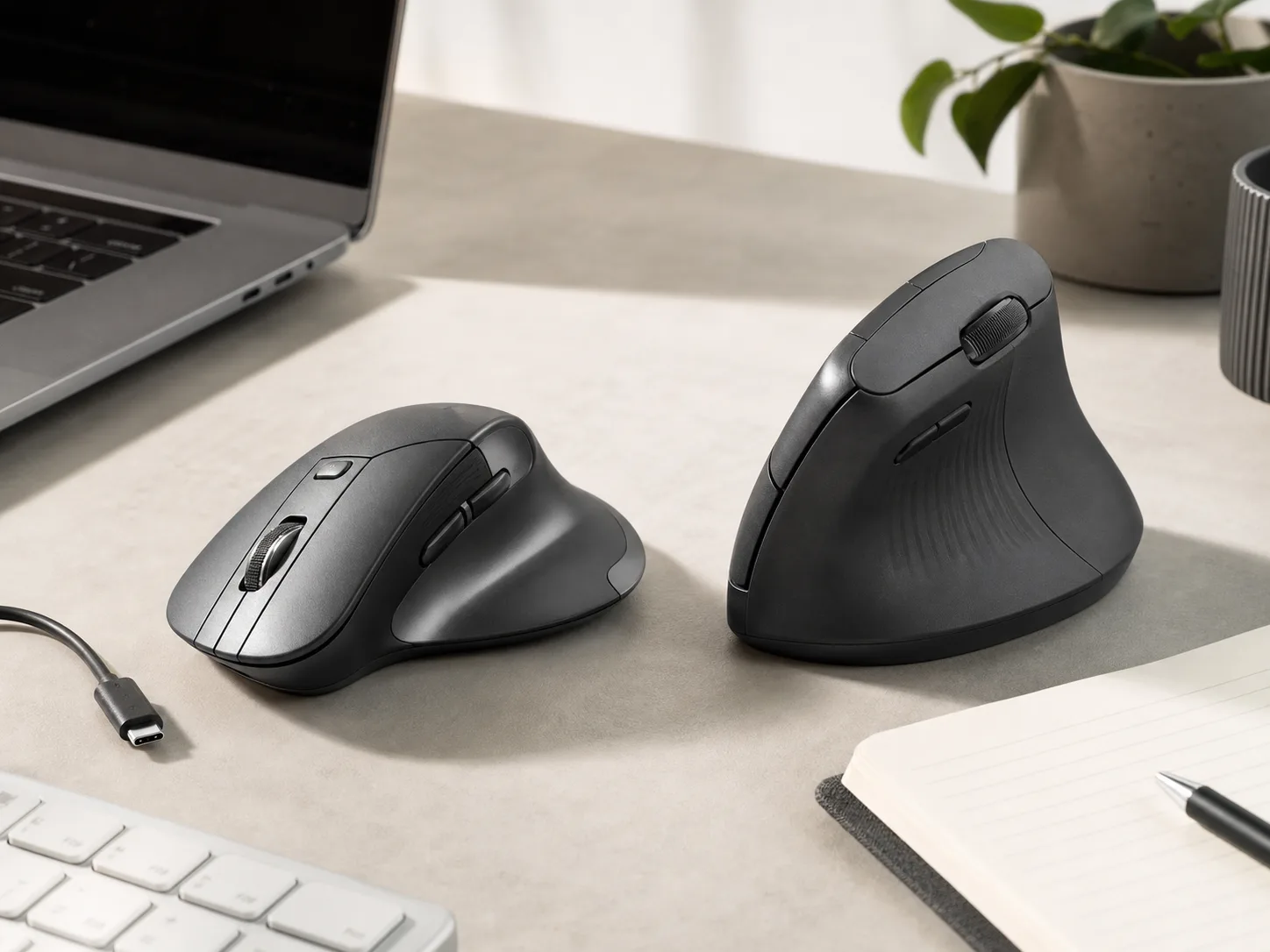
Two unbranded wireless productivity mice on a bright desk with a laptop, keyboard, USB-C cable, notebook, pen, and plant for the Logitech MX Master 3S vs MX Vertical comparison
Last checked
Winner Logitech MX Master 3S
Vertical-grip alternative Logitech MX Vertical
Verdict

Which one should most people buy?

Both are premium Logitech mice for desk work, but they solve different problems. One is a feature-packed productivity mouse; the other is a vertical-shape choice for people who already know they want that grip.

MX Master 3S is the safer default unless you specifically want a vertical mouse.

Logitech positions MX Master 3S around performance features: an 8,000 DPI optical sensor that can track on glass at a 4 mm minimum thickness, Quiet Clicks, MagSpeed electromagnetic scrolling, and Logi Options+ adjustments on Windows and macOS.

MX Vertical has a very different reason to exist. Logitech highlights its 57-degree vertical angle, natural handshake position, thumb rest, and large-to-medium-hand fit. That can be exactly what some shoppers want, but it is a shape commitment more than a universal productivity upgrade.

At a glance

The key differences

Best productivity mouse pick

Logitech MX Master 3S

MX Master 3S is the better choice for spreadsheet work, creative apps, research, coding, and multi-window days where scroll feel, precision, and shortcut customization matter more than an upright grip.

Tracking
8,000 DPI optical sensor with glass tracking support at 4 mm minimum thickness
Scrolling
MagSpeed electromagnetic wheel, described by Logitech as fast enough for 1,000 lines per second
Click feel
Quiet Clicks with the same click feel and lower listed click noise versus MX Master 3
Software
Logi Options+ sensitivity and workflow customization on Windows and macOS
Best role
Feature-rich desk mouse for productivity, shortcuts, and precision work
Vertical-grip alternative

Logitech MX Vertical

MX Vertical is the pick for shoppers who want Logitech's upright hand position and large-to-medium-hand shape, even if that means giving up the MX Master 3S scroll-wheel and sensor headroom story.

Shape
57-degree vertical angle with a natural handshake-style position
Hand fit
Logitech describes the body as designed for large to medium hands
Series
Part of Logitech's MX line, with an advanced ergonomic mouse positioning
Grip priority
Thumb-rest vertical body for shoppers who prefer an upright mouse posture
Best role
Dedicated vertical mouse for people who already know that shape fits their desk habits
Buyer guide

Choose by hand shape and workflow.

A mouse can have a great spec sheet and still be wrong for your hand. Decide first whether you want a traditional sculpted productivity mouse or a vertical shape, then compare features.

MX Master 3S

Buy this if / skip this if

Buy this if
  • You spend the day moving through spreadsheets, documents, timelines, browser tabs, or long pages.
  • You want Logitech's 8,000 DPI sensor and glass-tracking support for varied desk surfaces.
  • You will actually use Logi Options+ to tune buttons, scroll behavior, and app-specific shortcuts.
Skip this if
  • You are shopping specifically because you want an upright vertical mouse shape.
  • You dislike heavier sculpted mice with thumb rests and multiple controls under your hand.
  • You only need basic pointing and scrolling, not a premium workflow mouse.
MX Vertical

Buy this if / skip this if

Buy this if
  • You already know an upright handshake-style mouse feels better for your daily pointer work.
  • Your hand is in Logitech's large-to-medium fit target and you want a tall thumb-rest body.
  • You value a shape change more than the MX Master 3S sensor, scroll, and shortcut feature set.
Skip this if
  • You have never used a vertical mouse and need a safe default for shared or uncertain desk setups.
  • You want MagSpeed scrolling, very high DPI headroom, or the broad productivity-control layout.
  • Your desk tray, bag, or keyboard position does not have room for a taller mouse profile.
8K DPI is not only for huge monitors

The MX Master 3S sensor headroom lets you lower or raise sensitivity in software without fighting the surface. It is useful when you move between desk mats, bare desks, and high-resolution displays.

Scroll feel changes the day

MagSpeed matters when you live in long documents, code, calendars, or spreadsheets. The time saved is small per action, but it repeats all day.

Vertical shape is a commitment

The MX Vertical body changes your wrist and hand angle at the desk. That can be the point, but it also means it is less universal for shared desks, travel bags, and people switching from standard mice.

Before you buy

Check your desk setup before choosing a shape.

  • Measure the clearance under keyboard trays or monitor shelves if you are considering the taller MX Vertical shape.
  • Confirm Logi Options+ support for your computer if button customization is part of the purchase reason.
  • If several people share the same mouse, MX Master 3S is the safer default because its shape is less specialized.
  • If you use glass, glossy, or mixed desk surfaces, MX Master 3S has the clearer official tracking claim.
Side by side

Compare the trade-offs.

MX Master 3S has the broader published productivity feature set. MX Vertical is the more specialized shape choice.

Key buying trade-offs for Logitech MX Master 3S and Logitech MX Vertical, based on Logitech product pages and software information checked June 14, 2026.
Metric Logitech MX Master 3S Logitech MX Vertical
Best fit Winner Most productivity desks, multi-app work, high-resolution displays, and shoppers who want shortcut control. People who specifically want a vertical handshake-style mouse and whose hand fits Logitech's large-to-medium target.
Shape priority Sculpted horizontal mouse with thumb-rest productivity controls and a traditional hand position. Advantage Upright 57-degree vertical angle with a tall thumb-rest body.
Tracking claim Advantage Logitech lists an 8,000 DPI optical sensor that tracks virtually anywhere, including glass at 4 mm minimum thickness. Logitech's public page emphasizes vertical shape and hand fit more than sensor headroom.
Scrolling Advantage MagSpeed electromagnetic wheel, with Logitech claiming up to 1,000 lines per second. More conventional scrolling; the purchase reason is the grip angle rather than wheel speed.
Software fit Logi Options+ supports sensitivity adjustment and workflow customization on Windows and macOS. Works best for buyers who want a vertical shape first and software customization second.
Main drawback Wrong fit if you are specifically seeking an upright vertical mouse body. Less universal than MX Master 3S, especially for shared desks, travel bags, and shoppers unsure about vertical mice.
How we compared

The criteria behind the pick.

We weighted the comparison around real desk friction: pointer precision, scrolling, shape commitment, software customization, and whether the mouse needs to work for one person or a shared setup.

Published workflow features

We gave MX Master 3S credit for Logitech's explicit sensor, glass tracking, Quiet Clicks, MagSpeed, and Options+ claims because those features affect everyday productivity behavior.

Shape specificity

We treated MX Vertical as a specialist pick. Its 57-degree body is a strong reason to buy only if that is the shape you already want.

Omitted data

We left out prices, ratings, review counts, coupons, and live availability. Those details change often and are not needed to explain the core product choice.

Source trail

What the recommendation is based on.

Specs and positioning were checked against Logitech's official product and software pages plus product-specific Amazon pages. Prices, ratings, review counts, coupons, and live availability were intentionally left out.

FAQ

Questions before checkout.

The right choice depends on whether you want a better all-around productivity mouse or a specifically vertical one.

Which Logitech mouse is better for most desk work?

MX Master 3S is the better default for most desk work because it has the stronger published productivity feature set: 8,000 DPI tracking, glass-surface support, Quiet Clicks, MagSpeed scrolling, and Logi Options+ customization.

Who should buy MX Vertical instead?

Buy MX Vertical if you specifically want Logitech's upright 57-degree vertical shape and your hand size matches the large-to-medium fit Logitech describes.

Do these mice use the same shape?

No. MX Master 3S is a sculpted horizontal productivity mouse with a thumb-rest workflow, while MX Vertical uses a taller handshake-style body.

Is MX Master 3S worth choosing if I use glass or mixed desk surfaces?

It is the clearer choice for that use case because Logitech specifically lists glass tracking support for MX Master 3S at a 4 mm minimum glass thickness.

Should I buy a vertical mouse without trying one?

Only if you are comfortable with a shape change. Vertical mice feel different from standard mice, so MX Master 3S is the safer default when you are buying for a shared desk or an uncertain preference.

Best productivity mouse pick

Logitech MX Master 3S

It is the better buy for most Logitech mouse shoppers because the official feature set is broader and more directly useful across desk work. Choose MX Vertical only when the vertical grip shape is the reason you are shopping.

Last checked: . Retailer availability, coupons, delivery estimates, and other listing details can change without notice.

Decision notes
Best productivity pickLogitech MX Master 3S
Best vertical-grip pickLogitech MX Vertical
Data sourceLogitech official pages and product-specific Amazon pages
Last checked
MX Master 3S Best productivity mouse pick
Amazon